 Stock Trading
Now trade in ₹9 Per Order or ₹ 999 Per Month Plans.
 Future & Options
Access F&O contracts with advanced tools for hedging and speculation.
 Currency Trading
Trade in major currency pairs and manage forex exposure efficiently.
 Commodity Trading
Diversify Trading with MCX & NCDEX by Trading in Gold, Silver, Base Metals, Energy, and Agri
Products.
 Margin Trading Funding
Boost your buying power with upto 5X, Buy now Pay Later
 Algo Trading
Back test, Paper Trade your logic & Automate your strategies with low-latency APIs.
 Trading View
Leverage Trading View charts and indicators integrated into your trading platform.
 Advanced Options Trading
Execute multi-leg option strategies with precision and insights.
 Stock Lending & Borrowing
Earn passive income by lending stocks securely through SLB.
 Foreign Portfolio Investment
Enable NRIs and FPIs to invest in Indian markets with ease and compliance.
 IPO
Invest in upcoming IPOs online with real-time tracking and instant allotment updates.
 Direct Mutual Funds
0% Commissions by investing in more than +3500 Direct Mutual Fund Scheme.
 Corporate FDRs
Earn fixed returns with low-risk investments in high-rated corporate fixed deposits.
 Stocks SIPs
Build long-term wealth with systematic investment plans in top-performing stocks.
 Bonds & NCDs
Access secure, fixed-income investments through government and corporate bond offerings.
 Depository Services
Safely hold and manage your securities with seamless Demat and DP services with CDSL.
 RMoney Quick
Fast, hassle-free trading in one tap.
 RMoney Rocket
Power-packed platform for active traders.
 Rocket API
Lightning-fast trading API for developers advanced algo traders.
 XTS Algo
Smart algo trading software for precision trades.
 Journey
Tracing our growth and milestones over time.
 Mission & Vision
Guided by purpose, driven by long-term vision.
 Why RMoney Platform
Smart, reliable platform for all investors' needs.
 Management
Experienced leadership driving strategic financial excellence.
 Credentials
Certified expertise with trusted industry recognition.
 Press Release
Latest company news, updates, and announcements.
 Testimonials
Real client stories sharing their success journeys.
 7 Reasons to Invest
Top benefits that make investing with us smart.
 SEBI Registered Research
Trusted insights backed by SEBI-compliant research.
 Our Technology
Advanced tools enabling efficient online trading.
 Blog
Stay updated with expert insights, market trends, and trading strategies through our
informative blogs.
 Video
Learn visually with easy-to-understand videos covering trading concepts, tips, and market
analysis.
 Podcast
Tune in to insightful discussions and expert opinions anytime, anywhere.
 Telegram Community
Be part of an active trader community sharing ideas, updates, and market opportunities in
real-time.
 WhatsApp Updates
Get instant alerts, key market updates, and important notifications directly on WhatsApp.
 Financial Calculators
Plan your trades, margins, and returns efficiently with our smart calculation tools.
 Marketplace
Discover curated tools, strategies, and services designed to enhance your trading
experience.
 Daily Research Reports
Stay ahead with timely market insights, trends, and actionable analysis delivered every day.
 Dedicated Advisory
Get personalized guidance and expert recommendations tailored to your trading goals.
 Research Team
Backed by experienced analysts delivering data-driven insights and market expertise.
 Research Reports
Access in-depth reports covering stocks, commodities, and market movements to support
informed decisions.
 Feedback
Share your suggestions or concerns to help us improve your experience.
 Downloads
Access important forms, software, and documents in one place.
 Locate Us
Find the nearest RMoney branch or service center quickly.
 Escalation Matrix
Resolve issues faster with our structured support escalation process.
 Back Office
Log in to view trade reports, ledger, and portfolio statements anytime.
 Account Modification
Update personal or bank details linked to your trading account.
 Fund Transfer
Transfer funds instantly online with quick limit updation to your trading account.
 Bank Details
View our registered bank account details for seamless transactions by NEFT, RTGS or IMPS.
 RMoney Rocket Web Version
Experience powerful web-based trading with advanced tools for algo traders.
 Refer & Earn
Invite friends and earn rewards every time they trade with us.



How to Enable Algo Trading in Your Demat Account with RMoney?
By: Akriti Tomar | Date : Jun 4, 25
In today’s fast-paced trading environment, Algo Trading (Algorithmic Trading) has become increasingly popular among retail traders. It offers faster order execution, reduced human bias, better efficiency, and the ability to trade without staying sitting in front of your screen all day.
If you have a well-tested trading strategy and a good understanding of the markets, Algo Trading can give you a powerful edge over traditional manual trading.
At RMoney, we make this process even easier by offering free API access to all our clients. This allows you to seamlessly connect your RMoney Demat Account with your preferred Algo Trading platform.
Once your Demat account is opened, a Dedicated Advisor will be assigned to you who will personally guide you through the process. Alternatively, you can follow these simple steps to enable Algo Trading on your own:
Steps to Enable Algo Trading in Your RMoney Account:
- Login to the Account Modification Module
Click here to access the module
Enter your Client Code and click on Verify OTP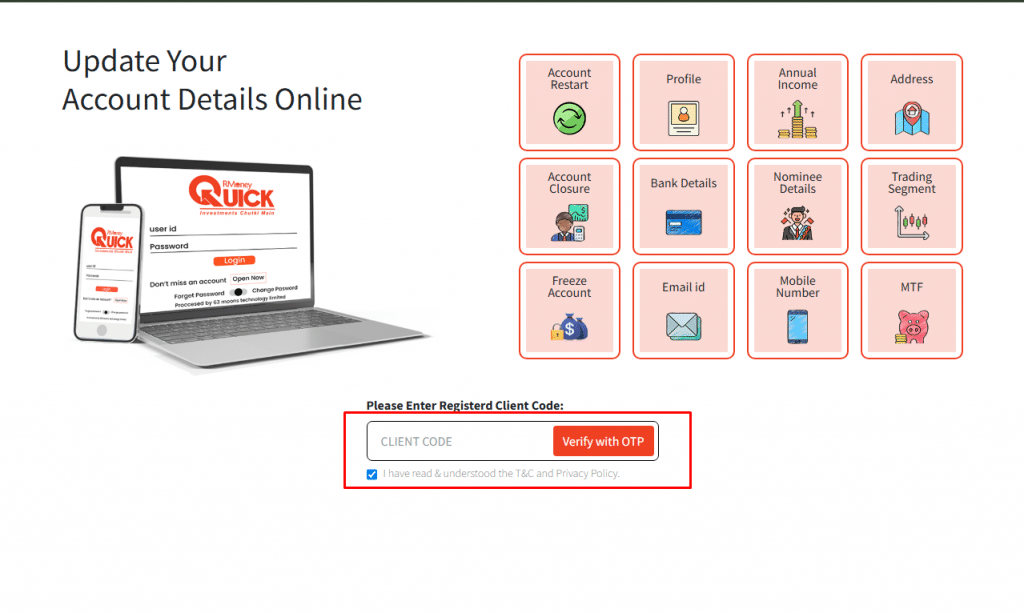
- Enter the OTP
Check your registered mobile or email for the OTP and click on Verify OTP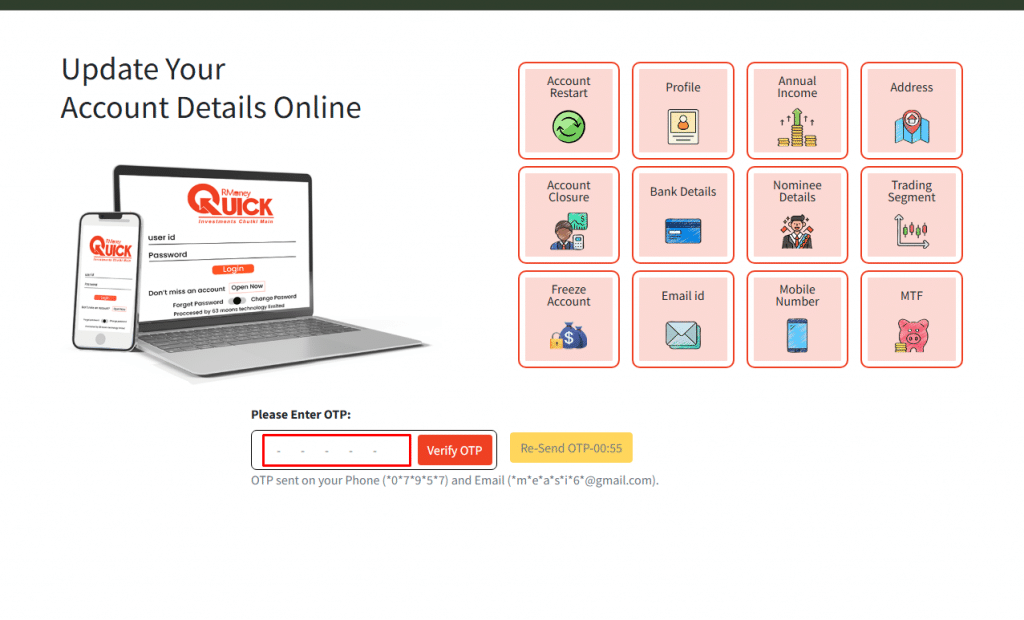
- Select ‘Algo Authorization’
On the next screen, choose Algo Authorization and click on Continue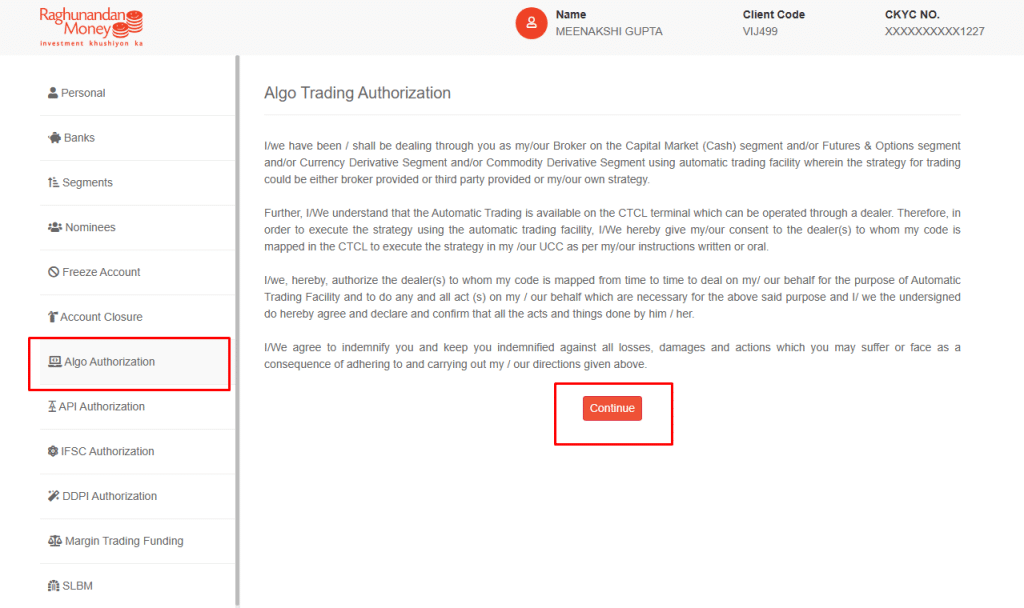
- Agree to Terms
Tick the checkbox to agree with the terms and select your preferred OTP mode (Email or Mobile Number). Then click on Send OTP…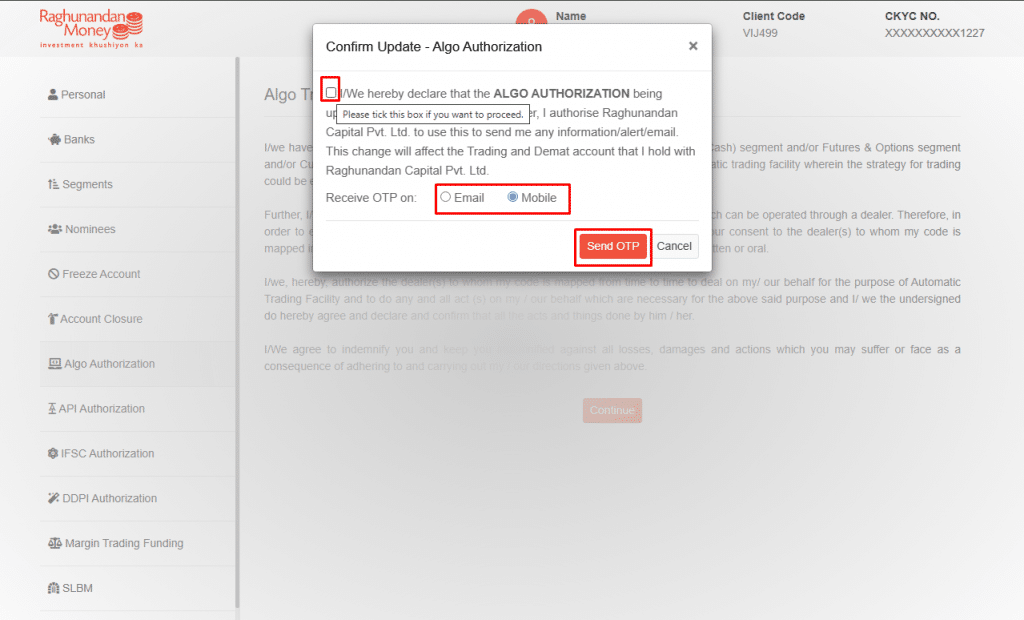
- Enter and Verify OTP
Enter the received OTP and click on Verify OTP.
Once completed, your request for Algo Trading will be successfully submitted.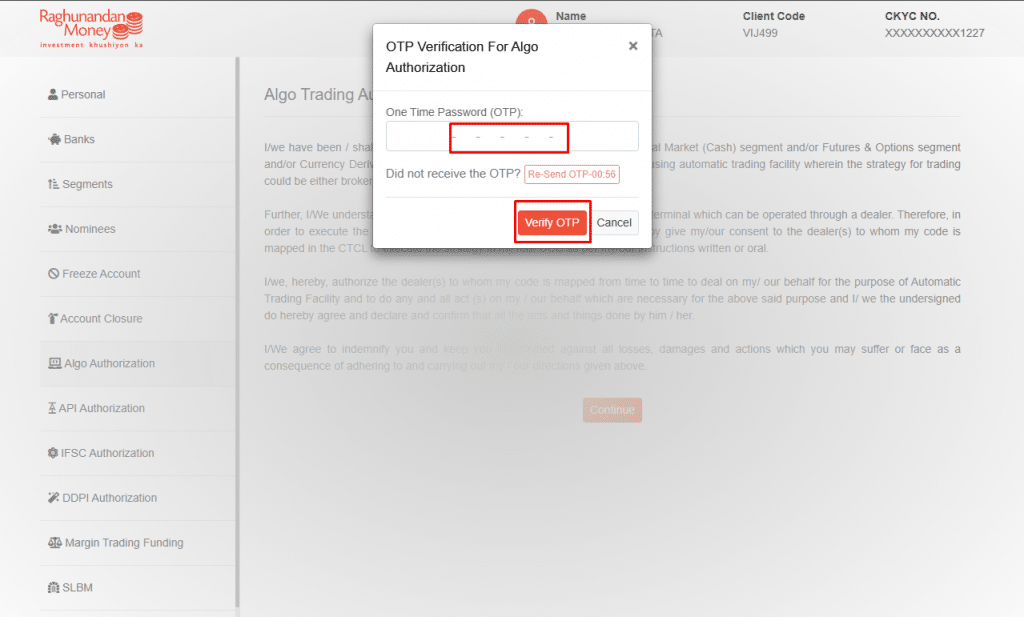 For any assistance, feel free to reach out to your RMoney Advisor or contact our Customer Care at 0562-4266600 / 7188900.
Table of content
Categories
Open Demat Account 




Related Posts
-

Are there any tools available to backtest trading strategies at RMoney?
RMoney does not offer a built-in backtesting tool. However, you can connect your RMoney account...
-

How to Generate a TPIN
Introduction A TPIN (Transaction Personal Identification Number) is a six-digit code that strengthens the security...
-

Is My Profile Public By Default?
Yes, even though the profile is public, the information shown is completely in your control....
-

What is Quarterly Settlement of NSE Account?
As per Exchange Circular: MIRSD/SE/Cir-19/2009 dated 03.12.2009, the actual settlement of funds and securities needs...





Filing Complaints on SCORES (SEBI) – Easy & Quick
- Register on SCORES Portal (SEBI)
- Mandatory details for filing complaints on SCORES:
- Name, PAN, Address, Mobile Number, E-mail ID
- Benefits:
- Effective Communication
- Speedy redressal of the grieva`nces


IT'S TIME TO HAVE SOME FUN!
Your family deserves this time more than we do.
Share happiness with your family today & come back soon. We will be right here.
Investment to ek bahana hai,
humein to khushiyon ko badhana hai.
E-mail
askus@rmoneyindia.com
Customer Care
+91-9568654321



Trade Endlessly with
RMoney
Deep Discount Brokerage Plan
At 999/Monthly
- Dedicated round the clock Advisory Support
- High performance in depth research
- Save more than ₹10,000 brokerage Per Month
- Ultra fast trading app